2007/04/28
Don't trust the box
I would have never expected the box to lie to me, but that's exactly what happened. I purchased a Belkin Wireless G Plus MIMO (F5D9050) at BestBuy because the box had Mac logo on it and a mention of Mac OS® X 10.3.x, and 10.4.x. under the System Requirements.
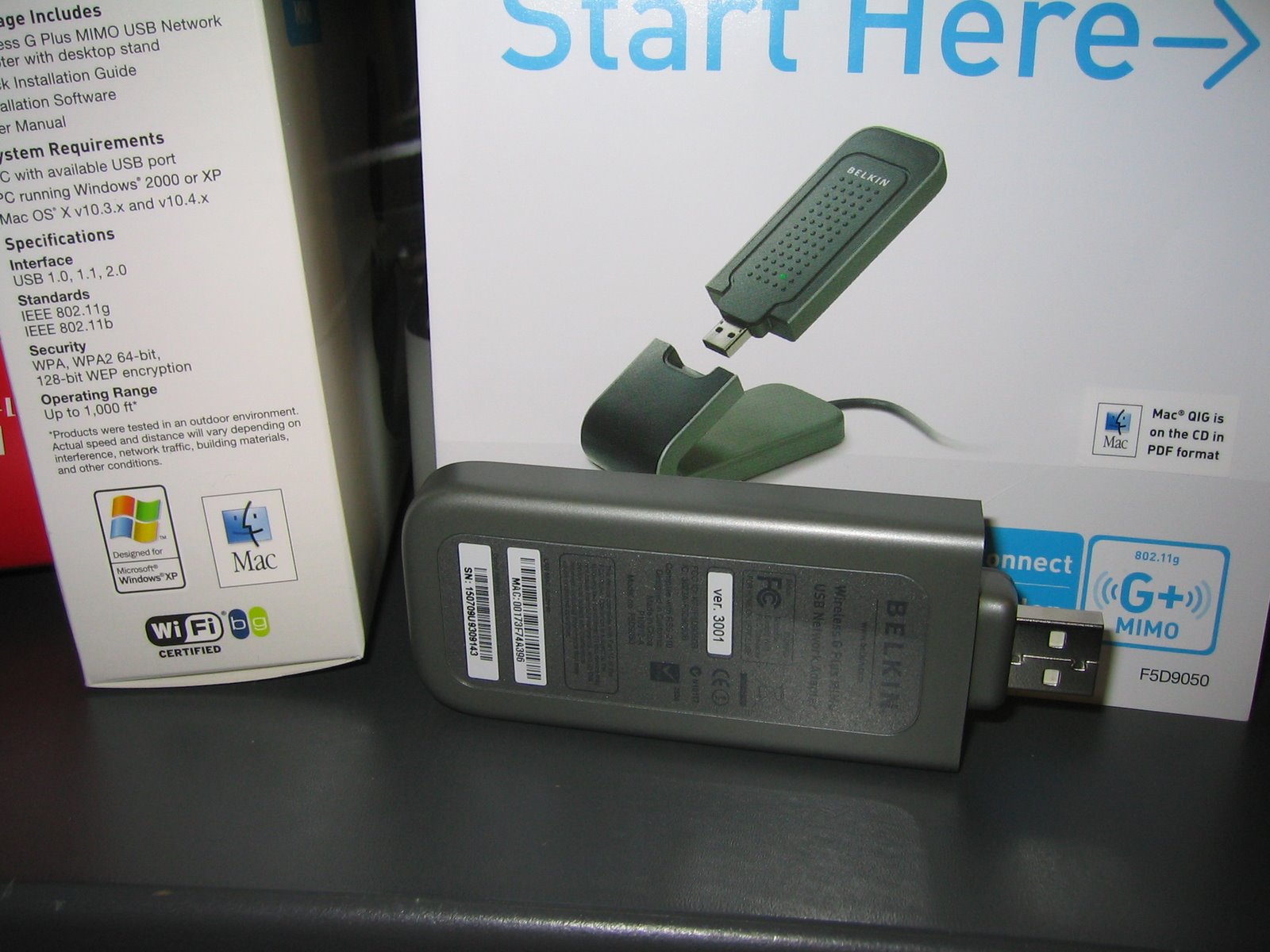
When I got it home I plugged it into a Mac Mini and waited for something to happen. Nothing did. I opened the Network system preference expecting to see notification of a new device. That didn't happen either. Despite my best judgment I decided to read the manual. Aside from a sticker on the cover it made no mention of a Mac at all. Written on the sticker was "Mac® QIG is on the CD in PDF format." Maybe my answer would be in there.

I promptly put the CD in my computer and began to sift through the unintelligible layout. Who would ever need to look through one of these, I thought to myself. After traversing each directory I came across what appeared to be the user manual. This too wasn't much better then the printed manual, except for mentioning "Mac OS® X v10.3.x or v10.4.x" under the System Requirements. Aside from that it was devoid of any other Mac specific reference. So much for that sticker.
Now a half hour in, I figure maybe setup isn't even necessary and that it can be generically driven. Maybe its the Mac Mini who doesn't like it. Next its plugged into my PowerBook which sees it in System Profiler, but won't make any use of it.
At this point it must be broken, so I plug it into a PC just to be certain. Window XP recognizes it and prompts for the drivers. I put in the CD and Windows goes to work installing the device. A minute later a window pops up "searching for networks" and the green LED is lit.
I can only assume at this point that there must be a Mac driver on the website. Not only was there no Mac driver, but no specific Mac "QIG." I download the manual, which though different from the one on the CD, had the same system requirements listed.
Now an hour in, I decided to call tech support, because surely some else would have noticed this by now. A few minutes later I was connected to someone in India and proceeded to tell them my predicament. After a minute or two on hold they come back to tell me that it has no Mac support. Despite going on how both the box, sticker on the manual, and system requirements all made mention of a Mac, they didn't seem phased at all. They put me on hold again while they checked something else, or for effect. Only to come back and reiterate that there was no Mac support for the Belkin F5D9050, but an earlier (slower) model might work. Great thats just what I need, to try this all again.
The next day I went back to BestBuy and had no trouble returning it, but received no assurance that they were going to do anything about all those other boxes out there that beckon other unsuspecting Mac users. I was hoping some spark of caring, maybe even a false hope, like "we'll contact the manufacturer" or "thanks for letting us know." Nothing.
I hope at least someone learned something from all of this.

When I got it home I plugged it into a Mac Mini and waited for something to happen. Nothing did. I opened the Network system preference expecting to see notification of a new device. That didn't happen either. Despite my best judgment I decided to read the manual. Aside from a sticker on the cover it made no mention of a Mac at all. Written on the sticker was "Mac® QIG is on the CD in PDF format." Maybe my answer would be in there.

I promptly put the CD in my computer and began to sift through the unintelligible layout. Who would ever need to look through one of these, I thought to myself. After traversing each directory I came across what appeared to be the user manual. This too wasn't much better then the printed manual, except for mentioning "Mac OS® X v10.3.x or v10.4.x" under the System Requirements. Aside from that it was devoid of any other Mac specific reference. So much for that sticker.
Now a half hour in, I figure maybe setup isn't even necessary and that it can be generically driven. Maybe its the Mac Mini who doesn't like it. Next its plugged into my PowerBook which sees it in System Profiler, but won't make any use of it.
At this point it must be broken, so I plug it into a PC just to be certain. Window XP recognizes it and prompts for the drivers. I put in the CD and Windows goes to work installing the device. A minute later a window pops up "searching for networks" and the green LED is lit.
I can only assume at this point that there must be a Mac driver on the website. Not only was there no Mac driver, but no specific Mac "QIG." I download the manual, which though different from the one on the CD, had the same system requirements listed.
Now an hour in, I decided to call tech support, because surely some else would have noticed this by now. A few minutes later I was connected to someone in India and proceeded to tell them my predicament. After a minute or two on hold they come back to tell me that it has no Mac support. Despite going on how both the box, sticker on the manual, and system requirements all made mention of a Mac, they didn't seem phased at all. They put me on hold again while they checked something else, or for effect. Only to come back and reiterate that there was no Mac support for the Belkin F5D9050, but an earlier (slower) model might work. Great thats just what I need, to try this all again.
The next day I went back to BestBuy and had no trouble returning it, but received no assurance that they were going to do anything about all those other boxes out there that beckon other unsuspecting Mac users. I was hoping some spark of caring, maybe even a false hope, like "we'll contact the manufacturer" or "thanks for letting us know." Nothing.
I hope at least someone learned something from all of this.

Labels: Belkin F5D9050, waste of time
24 Comments:
Amen my friend, wish I had read this before I did the exact same thing today. Guess it's back to Best Buy in the AM.
Cheers
By
Anonymous, At
4/30/2007 10:26 PM
So it wasn't just me!
By
Scott, At
5/01/2007 9:06 AM
I just wasted several hours of my life working through this same problem. I called Belkin support twice. Both times, I got a bad connection that exacerbated the difficulty of understanding the support personnel.
The first time, I was told that there was no Mac support for the F5D9050. When I pointed out that either the support personnel or the packaging and documentation had to be wrong, they sent me to raylink.com to "download the driver." Don't waste your time -- it's not there.
During both calls, I was told that the F5D7050 (versions 2000 or 3000) would work and that I could exchange this product for that one. Thanks, but what about the waste of my time and the act of false advertising? This was a blatant misuse of the Mac logo and trademark by Belkin and it shows a flagrant disregard for their customers.
Belkin should face some consequences. At the very least, instead of telling customers to spend more of their time correcting the company's mistakes, Belkin should provide a working model (e.g., the F5D7050) as compensation for the time they've forced their customers to waste already. But, I'm not holding my breath.
Of course, I won't trust any of Belkin's claims about their products, in the future. As a Mac developer, I'll see if I can find someone at Apple who'd be interested in pursuing the logo misuse and trademark infringement aspects of this case. In the meantime, I'll have to find a wireless USB adapter that actually is Mac-compatible -- but rest assured it won't be a Belkin product.
By
Jim, At
5/17/2007 12:54 AM
I am an employee of CompUSA and was also deceived by the box. Since Apple discontinued the original Airport cards my co-workers and I have never had a solution for cusomters wanting to add wireless to their macs that can't take the airport extreme cards (older G4 IMacs, Mac minis, Ibooks, etc)
When I saw the box had the mac logo I was excited to finally offer my customers a solution. However 2 days later when a customer wanted to try it out in-store before buying, we went through the exact steps those above have done and were left without a resolution but to return it.
The Apple Airport card has been discontinued for over two and a half years and there has never been a simple replacement available in our store since, yet we carry over six different brands of wireless networking equipment each with about three lines of products (G, G+MIMO, N, etc).
I guess I'll just keep having to direct customers to third-party drivers, ebay for old airport cards, or ethernet bridges.
By
CompUSA Employee, At
5/18/2007 11:38 AM
I think ethernet bridges are the way to go if you can't get the Apple part. I was hoping for a small and inexpensive USB solution, but those appear to be hard to come by. Belkin did say there was a different model that supported Macs, but I wasn't about to take them on their word after what happened.
I'm going to most likely get a mezzanine board and antenna off of eBay for the Mac Mini, that or find a cheep ethernet bridge.
By
Scott, At
5/18/2007 1:20 PM
This whole thing is as irritating as all hell! The same thing happened to me today. Carlos from tech support was of no help at all! And I tried to call the company to complain but I couldn't get through. Assholes!!
By
Dolls, At
5/20/2007 6:40 PM
I'm new to the MAC world and this is the SECOND time something like this has happened to me. I tried installing Cubase LE right out of the box and had a similar experience (although at least I was eventually directed to an updated setup file to work w/ OS X.
I guess I'll take my brand new F5D9050 back to Best Buy as well- this is SO irritating.
By
Anonymous, At
5/20/2007 7:38 PM
I purchased the F5D9050 with the same idea in mind as all of you then I got home installed the USB card and had the same problem.
I was pissed so I started to do some research and came across this link http://www.ralinktech.com/ralink/Home/Support/Macintosh.html
I installed the software on my mac mini, rebooted and low and behold the link light started blinking, launched their software and it saw all the wireless networks around me so I continued setting up a profile for my wireless network and rebooted again and to my surprise every thing worked.
Kind of silly I had to go through all this but hopefully this will help some of you.
Good luck
By
Geoff, At
5/23/2007 12:24 AM
I also bought this device (grumbled a lot about the box and sticker). I couldn't get it working with the downloaded driver from ralinktech.com. However, an email to ralinktech support at 9pm EST was answered within 2 hours with an more recent driver from May 2007. Works like a charm. Amazing, I hope they will have a leopard driver not long after it is released.
thanks for the details.
By
Anonymous, At
5/24/2007 10:47 PM
Just a footnote to my prior (anon) note. belkin support responded this morning with a reference to the ralink drivers. They are stated that the belkin site will have the Macintosh drivers "very soon"... so maybe they are going to fix this mess with OS X support.
By
Anonymous, At
5/25/2007 7:17 AM
All of this is enough to make someone want to run an ethernet cable.
By
Scott, At
5/29/2007 3:29 PM
Apparently there are two versions of the hardware for the F5D5090: version 3xxx (e.g., 3000), and 4xxx. The
former has only beta-level Mac support while the latter has production drivers:
http://www.belkin.com/support/article/?lid=en&pid=F5D9050&aid=5925&scid=0
A lot of retailers seem to be selling the 3000 version of the device (e.g., Target in Mountain View, CA).
I see from the photo in your blog
that you had a ver. 3001 device.
I'm currently trying to find a retailer that has a 4xxx version.
By
Anonymous, At
8/20/2007 5:48 PM
Oh great, Ralink drivers. I bought a ASUS USB wireless adapter that uses the same Ralink chip-set. Those drivers suck.
First of all, you have to have to use their "Wireless Setup Utility" to do anything, and networking services isn't even available till a short while after login. So auto-mounting network drives is impossible. I couldn't even get it to stay connected when I was pushing files onto the Mac Mini over the network via AFP. The Console would show some USB error and the device would disappear from the "Wireless Networking Utility."
I had to return the thing and go back to using a Ethernet cable. I'm starting to think I should use a bridge, unless I can find a cheep mezzanine board and airport card.
By
Scott, At
8/20/2007 8:21 PM
Found Driver for OSX Here.
http://www.belkin.com/support/article/?lid=en&pid=F5D9050&aid=5925&scid=0
I installed and it works. The only issue I have is that after a restart I have to unplug and replug it to get it working again.
By
Kirk, At
8/27/2007 10:56 PM
I'm the commenter who mentioned the 4000-series version numbers for the F5D9050 a few posts back [8/20/2007 5:48 PM]. In the mean time I've both called and written to Belkin customer service, and here is the information I received: they are still selling down their inventory of 3xxx-series devices, so they could not provide a way to buy a 4xxx-series device yet. They said that the chipset has not changed between 3xxx and 4xxx and that the Mac driver has also not changed.
Downloads for both are available at the Belkin Web site, for both Mac OS X 10.3 and 10.4. I have not attempted to actually compare the 3xxx driver (and application) with the 4xxx software to see if the claim that they are the same holds up.
They refused to disclose what differences there actually are between the 3xxx and 4xxx versions.
Based on this information, I decided to go ahead and buy a 3xxx model. I was able to find both 3000 and 3001 at retail. I asked Belkin whether there was any relevant difference between the two for Mac users. They said no.
I bought the 3001 ($49.99) and downloaded the driver and application from Belkin.
I have a late-model PB-G4 still running 10.3. I found the installation trouble-free, and the card worked instantly. Performance is so much better than the built-in 802.11g that it isn't funny. I can routinely get reliable signals from hundreds of feet away and in circumstances when I couldn't even see a hint of signal with the built-in wireless.
Compared to the built-in wireless, I see significantly fewer fluctuations in performance, long drop-outs, etc. Presumably most of the benefits come from a) having an antenna that's more out in the open than the built-in ones, and b) from the MIMO technology's ability to make sense of reflected signals.
I've had relatively few problems with the F5D9050. I'm a bit obsessively defensive about clean sleeps and restarts (burned by very bad experiences in Windows 98, long ago), so I have not tried some of the things that people elsewhere on the Web have reported as causing problems -- like putting the laptop to sleep with the device plugged in. So I can't comment on those.
Here are the concerns that I do have:
- It appears that you cannot configure the card to not connect to a network automatically when you first plug it in. Regardless of what I've done with profiles, it will try to connect to some open network whenever I plug it in.
- When you plug the card in, a new network interface (en2) gets created. Well and good, but then when you unplug the card this interface is neither removed nor marked "down" (you can use the "ifconfig" command to see this). Certain software, like the Cisco VPN client, doesn't like seeing interfaces that are "UP" but not functional. So after the Belkin card has been plugged in once, and removed, you can't use the Cisco client until you execute the command "sudo ifconfig en2 down". I consider this a bug: when you are done with the card and it is unplugged, the en2 device should not be marked as "UP" any more.
- You can turn the radio off from the supplied utility application, but this setting is not sticky: the radio will be on again the next time you re-insert the card. I'd rather have this under my control.
But basically, I'm very satisfied. I would wish that Apple would provide some form of MIMO or draft-n wireless solution for the many of us who don't have this built in to our system. Even if that were just providing more support for third-party efforts, it would be a good thing.
(I can understand Apple not wanting to release a USB or Cardbus wireless adapter under their own name -- it would undermine the "it just works" simplicity that they like to maintain in their product line, and it would remove a reason for people to buy new MacBooks.)
So in summary I would say: highly recommended, if you have an old PB and you have problems with accessing networks in places that you need to be. I'm surprised, to be honest, after all I'd read on the Web.
By
Anonymous, At
8/29/2007 5:53 PM
One more thing: I can confirm the problems with the packaging that the original poster reported: the sticker saying that the Mac "Quick Install Guide" is included on the CD was there, and there was no Mac anything, whether code or documentation, on the CD.
But all the software was readily available on the Belkin site (this was evidently not the case when the OP was writing).
By
Anonymous, At
8/29/2007 5:58 PM
I guess the shared experiences of having to re-associate the device with the AP after plugging it in is due to the drivers. I wonder if the version of the Raelink driver that Belkin uses is different, or if the Belkin device is in some way more stable then the ASUS I tried. Its that or my Mini's USB bridge is failing.
I'm surprised the wireless on/off isn't preserved in the device. Especially given the driver doesn't act without intervention.
I'd like to find a stable solution so I don't have to pay a bunch for the Mezzanine Board and Airport Card.
By
Scott, At
8/29/2007 6:18 PM
Man do I wish I'd read this months ago! I purchased this adapter - specifically because of the supposed Mac compatibility - back in July 2007 from Best Buy for my PowerMac G5 Quad. Not being able to find the Airport Extreme kit for my G5 (don't get me started - whole other story), I was desperate for this one to work as there was no easy way to connect my G5 to my network in a new house.
Long story short, this adapter did work - sometimes. But it would also cause kernel panics that would crash my Mac 2 or 3 times a week; one of these causing my external hard drive to become corrupted!
I finally found the Airport Extreme kit for my Mac and it's been WONDERFUL compared to this Belkin mess. I agree with others that the "works with Mac" logo should be removed from this product. The driver just barely works and causes all sorts of other problems.
Of interest to some: I did learn that if you're outside of your return limit (at Best Buy or similar), like I am, you can return the product to Belkin for "website credit." Basically you send it back to them and they give your credit toward one of their other products available on their web site. Not a perfect solution by any means, but it's something...
By
Chris W., At
10/15/2007 12:09 PM
I just bought the same Belkin USB wireless F5D9050 because it said it was Mac compatible. Ha! Several hours and a couple of calls to tech support later, I am getting ready to take the trash back to Wal-Mart as I lament over the wasted time I will never get back!
Downloading and installing the RALink files mentioned earlier did no good.
What is a good USB device that I can plug and play in my old G4 to connect to my existing wi-fi? I don't want to mess with routers and bridges and whatnot. Otherwise, I'll have to figure out a way to run a CAT5 - which I would rather avoid if possible.
By
Stephen, At
10/27/2007 6:43 PM
I think finding the AirPort card on eBay would be the best / most compatible solution. I ended up swapping the Mac Mini without wireless for an Intel one that I had which had it built in.
That or an Ethernet bridge. They aren't too expensive and you won't have to worry about running shoddy divers.
By
Scott, At
10/29/2007 1:38 PM
the driver is on the site, i didnt read all the comments so i dont kno if this has already been pointed out but jus try serching it in the support section of the belkin site, im using the exact product on my mac (10.4) right now and its working beautifully. mine came with a cd with the driver on it as well as the cd u mentioned witch was strictly documentation, i guess they forgot to to stick the driver cd in some boxes or something.
By
Anonymous, At
11/14/2007 3:05 AM
Ralink makes the drivers for this. I downloaded them back in April after going through all of the headaches you all mention. This works very well on Tiger, but after upgrading to Leopard today, the Belkin device isn't recognized via the Ralink USB wireless utility.
Do a google search for Ralink usb wireless drivers to find the downloads.
By
Anonymous, At
12/01/2007 11:09 AM
Well all, I know this is an old post but I also have the same card... BUT... mine worked easily after downloading the drivers from your nemesis... Belkin. I do not mean to rub it in... only saying the card isnt a TOTAL loss :)
By
Daniel, At
3/15/2008 3:44 AM
Yeah I've heard of people recently getting it working, though if its the same Raelink drivers that I tried out with another card, then it isn't much good to say about all of this. I still stand by a Ethernet bridge to provide consistent pre-login connectivity, that or a real Airport card.
By
Scott, At
3/16/2008 4:51 PM
Post a Comment
Links to this post:
Create a Link
<< Home