2006/02/07
Mac mini dual monitors using DualHead2Go
EDIT: Further information is available in this post
When we first set up the office here in NYC, we made an early decision to go with Apple products for development. Now don't get me wrong, I love Apple, indeed I am a recent inductee into the Apple Fan Club. However, I have noticed a few... insufficiencies with the platform, many of which have little to do with the company itself. For example, the lack of a good time management system (apologies to iBiz).
Aside from my minor grievances on the software grounds, I have been a pretty happy customer. Except for one thing. The total lack of upgradability in the Mac Mini.
Now, I'm not retarded. I understand that the target market for the mini is not expected to have a 300GB drive, or 4GB of ram in the system. Hell, they're not expected to do one damn thing to it. I understand all this, but it still frustrates me that not only is it difficult to perform many of these upgrades, some of them are downright impossible.
Or are they?
One of the things that dissatisfied me most about using a mini day in and day out was the inability to drive dual monitors. Up until extremely recently, there was simply no way to achieve a very wide display. But then my own personal Christmas came, and I discovered the Matrox dualHead2Go. Many many posts and reviews have discussed this device since it came out. But what is it?
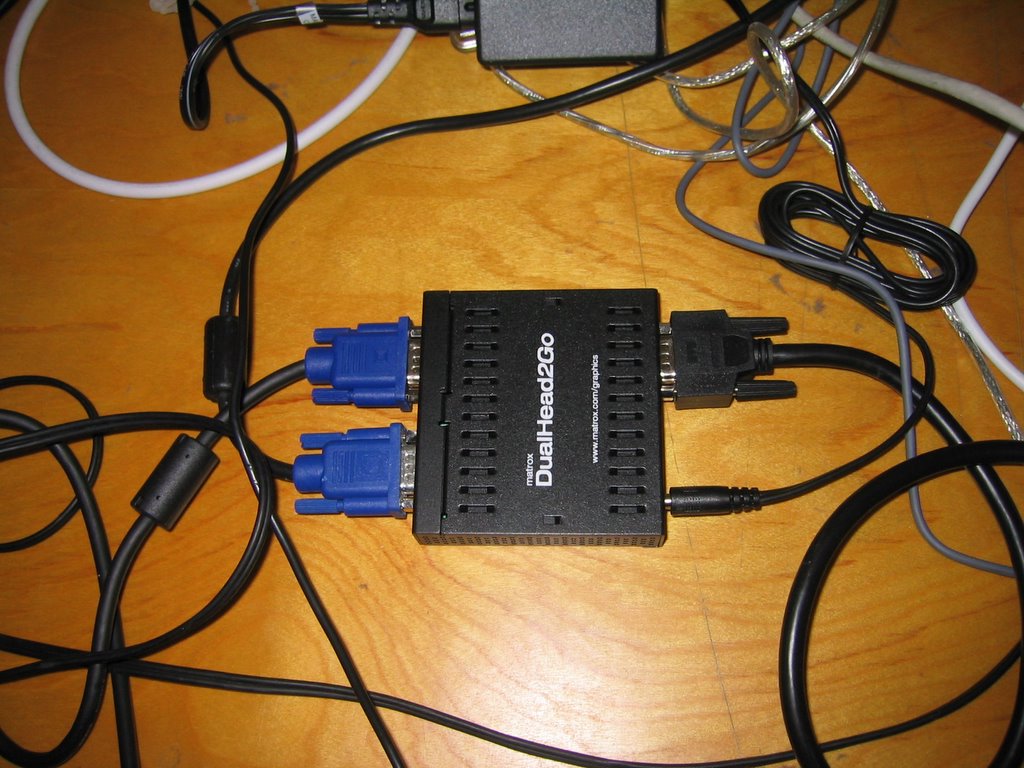
Simply put, this box acts as a splitter for a VGA signal. It effectively takes one VGA input, and splits each horizontal line in half, and feeds one half to one VGA output, and the other half to the (you guessed it) other VGA output. Unfortunately, according to Matrox, it's only supported under Windows. Well, I'm happy to say that this jigger works great under OSX too.

Required Hardware:
1x Matrox DualHead2Go
2x Monitor capable of 1024x768 or 1280x1024
For my particular setup, I went with the Westinghouse 17" 1280x1024 monitors, since I already had one. I picked up a second one for $190 on eBay, bringing my total outlay on monitors to $390. Add in the $170 on the dualHead2Go, and the total cost for hardware comes to $560, or about $300 less than Dell's 24inch widescreen. The total resolution on the dual screen monitor comes to 2560x1024, or 2,621,440 pixels, vs. Dell's at 1920x1200, or 2,304,000. While it would be nice to have all that space on one monitor, those savings are significant, at about a one third discount for the dual screen, or 50% increase to merge them into one screen.
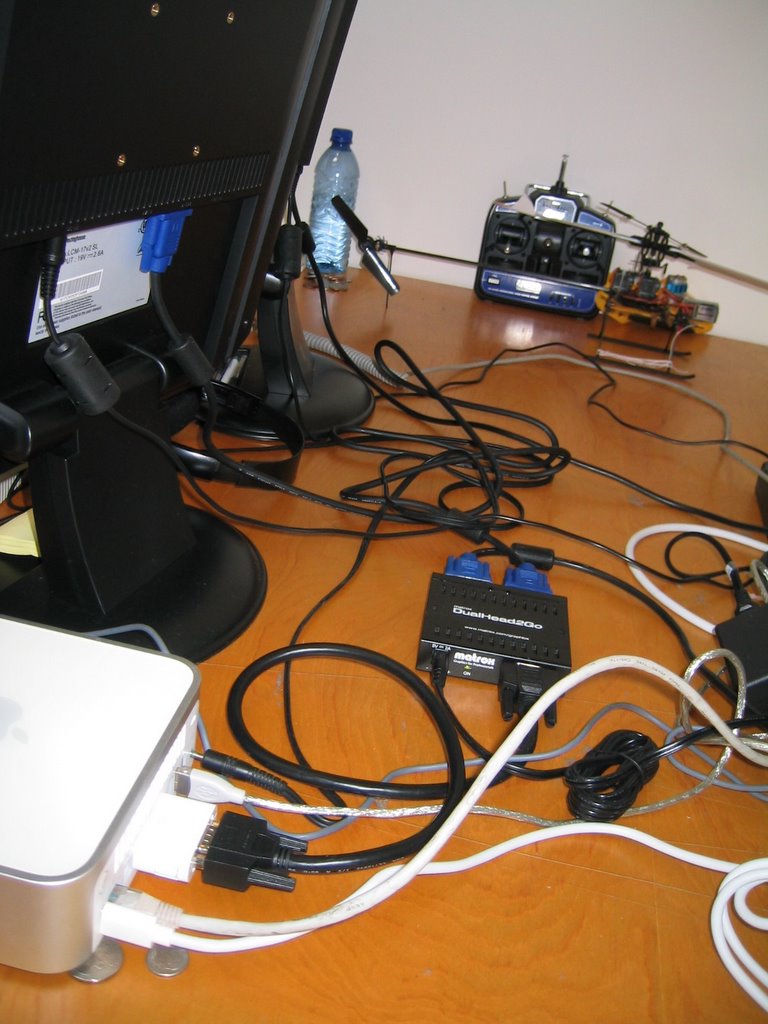
once you receive all the hardware, you simply plug it up in the (somewhat) natural way, mini to dualhead2go, out to two monitors. I added the custom resolution to the system using the SwitchResX tool, which has a free 15 day trial, and then costs $15. This process is fairly painless. You simply open up the SwitchRes control, and in the Resolutions tab hit Custom, then New. Put in 2560 for Horizontal, and 1024 for Vertical, hit Ok, and you're good to go! Shut down your mini, then hook up the Matrox box, restart, and you should be putting along in dualscreen mode.
Caveats, Warnings, Et cetera: This system does have it's downsides. For one, the system thinks it's driving one big monitor, which means it'll pop crap up in the middle of the screen, effectively splitting all dialog boxes and popups across the two monitors. Also, since the Matrox box is dealing with relatively high frequency signals, your monitors (as mine did) may have a difficult time syncing to the VGA signal. This means you may have to manually adjust the width and sync settings on your monitors. This has the additional negative that it can be extremely difficult for your monitors (particularly LCDs) to sync one pixel of incoming signal to one pixel of output, meaning that the output will be a little blurry as it averages the signal across two or more pixels of output.
However, to me these tradeoffs are more than worth it. As many already know, once you operate with dual screens, it is almost painful to go back. I'm very pleased with it.


EDIT: Further information is available in this post

When we first set up the office here in NYC, we made an early decision to go with Apple products for development. Now don't get me wrong, I love Apple, indeed I am a recent inductee into the Apple Fan Club. However, I have noticed a few... insufficiencies with the platform, many of which have little to do with the company itself. For example, the lack of a good time management system (apologies to iBiz).
Aside from my minor grievances on the software grounds, I have been a pretty happy customer. Except for one thing. The total lack of upgradability in the Mac Mini.
Now, I'm not retarded. I understand that the target market for the mini is not expected to have a 300GB drive, or 4GB of ram in the system. Hell, they're not expected to do one damn thing to it. I understand all this, but it still frustrates me that not only is it difficult to perform many of these upgrades, some of them are downright impossible.
Or are they?
One of the things that dissatisfied me most about using a mini day in and day out was the inability to drive dual monitors. Up until extremely recently, there was simply no way to achieve a very wide display. But then my own personal Christmas came, and I discovered the Matrox dualHead2Go. Many many posts and reviews have discussed this device since it came out. But what is it?
Simply put, this box acts as a splitter for a VGA signal. It effectively takes one VGA input, and splits each horizontal line in half, and feeds one half to one VGA output, and the other half to the (you guessed it) other VGA output. Unfortunately, according to Matrox, it's only supported under Windows. Well, I'm happy to say that this jigger works great under OSX too.
Required Hardware:
1x Matrox DualHead2Go
2x Monitor capable of 1024x768 or 1280x1024
For my particular setup, I went with the Westinghouse 17" 1280x1024 monitors, since I already had one. I picked up a second one for $190 on eBay, bringing my total outlay on monitors to $390. Add in the $170 on the dualHead2Go, and the total cost for hardware comes to $560, or about $300 less than Dell's 24inch widescreen. The total resolution on the dual screen monitor comes to 2560x1024, or 2,621,440 pixels, vs. Dell's at 1920x1200, or 2,304,000. While it would be nice to have all that space on one monitor, those savings are significant, at about a one third discount for the dual screen, or 50% increase to merge them into one screen.
once you receive all the hardware, you simply plug it up in the (somewhat) natural way, mini to dualhead2go, out to two monitors. I added the custom resolution to the system using the SwitchResX tool, which has a free 15 day trial, and then costs $15. This process is fairly painless. You simply open up the SwitchRes control, and in the Resolutions tab hit Custom, then New. Put in 2560 for Horizontal, and 1024 for Vertical, hit Ok, and you're good to go! Shut down your mini, then hook up the Matrox box, restart, and you should be putting along in dualscreen mode.
Caveats, Warnings, Et cetera: This system does have it's downsides. For one, the system thinks it's driving one big monitor, which means it'll pop crap up in the middle of the screen, effectively splitting all dialog boxes and popups across the two monitors. Also, since the Matrox box is dealing with relatively high frequency signals, your monitors (as mine did) may have a difficult time syncing to the VGA signal. This means you may have to manually adjust the width and sync settings on your monitors. This has the additional negative that it can be extremely difficult for your monitors (particularly LCDs) to sync one pixel of incoming signal to one pixel of output, meaning that the output will be a little blurry as it averages the signal across two or more pixels of output.
However, to me these tradeoffs are more than worth it. As many already know, once you operate with dual screens, it is almost painful to go back. I'm very pleased with it.
EDIT: Further information is available in this post

58 Comments:
Nice job! We featured you at BYODKM.net.
By
Joel, At
2/12/2006 12:06 AM
Great Effort there, but I have a few questions:
1) Can you post a picture of how blurry the pixels get using the matrox adapter
2) Is is possible to have the doc centred on one screen raher than at the corner of the desktop?
Cheers,
Callandor
By
Anonymous, At
2/12/2006 7:08 AM
Got here through Digg and I have to say that is awesome. I also have to ask what wallpaper that is. It looks great across two monitors.
By
CUBApete, At
2/12/2006 2:47 PM
is that WinAmp your running there...
what is that... hmm??
By
Anonymous, At
2/12/2006 3:18 PM
Isn't that an old ADB Keyboard I see there?
By
Willy B, At
2/12/2006 3:19 PM
At first glance, it looks great. But when I started thinking about it, there seem to be some issues with this config.
Imagine you want to play a game (okey, Mac mini isn't supposed to do that greatly). If you do it fullscreen, the image is spanned across both screens, since for Mac OS X, it's just one huge display connected to it.
Second, you cannot watch a movie fullscreen with - say - VLC or mplayer because of the same problem.
So my five cents: Get an Intel-iMac which sports a monitor out. I don't think the overall price tag varies a lot compared to buying this Matrox-solution together with two TFT-monitors ...
By
eMeidi, At
2/12/2006 6:52 PM
Now that is great. Anyone tried it with an iBook? I'm using it dual-screen from time to time, and it'd be great to use it triple-screen.
And if I configured the internal display to be the main one, i'd even have warnings and poups right in the middle of my primary screen.
By
Anonymous, At
2/12/2006 8:00 PM
Some answers:
Q: "Is is possible to have the doc centred on one screen raher than at the corner of the desktop?"
A: Possibly. In this case TinkerTool was used to pin the dock to one side of the screen, otherwise it ended up dead center. Initially Aniel had it set to appear going down the left side. I wouldn't be surprised if the internal setting is defined by screen coordinates, making it possible to virtually center it on one screen.
Q: "is that WinAmp your running there..."
A: That's WebKit's incomplete Web Inspector.
Q: "Isn't that an old ADB Keyboard I see there?"
A: Yes it is, Aniel wanted a clicky keyboard. So I surprised him. It's an Apple ADB keyboard used through a ADB to USB adapter. I wasn't sure they still worked anymore, but 10.4.x doesn't seem to mind. Only thing it doesn't do correctly is allow for booting into single user mode. We have to switch keyboards for that.
Q: "Imagine you want to play a game..."
A: This is an office computer. So the whole full screen thing doesn't apply much. Even then games typically can only use one monitor. It's not difficult to swap it down to one monitor if necessary. We tend to present things on my PowerBook, because it's hooked up to the stereo. The Mini's don't have much in the way of speakers, not that it should.
Aniel should have more answers in the morning. Thanks for helping to rank this post highly.
By
Scott, At
2/12/2006 8:12 PM
But isn't the resolution fairly low on that thing?
By
janrpeters, At
2/13/2006 11:06 AM
Great Work.
One question though:
Will this work on 12" powerbook using the mini-DVI to VGA cable.
I dont think there should be any glitches. But just need your inputs.
Thanks
Sharvil
By
Anonymous, At
2/13/2006 10:34 PM
Apple says that the Mac Mini will output video to 1900x1080, is that simply fixed with that program you mentioned?
By
Anonymous, At
2/14/2006 3:26 PM
Humm.
Where did you get that ADB to USB adapter. I cannot seem to find one.
Thnx.
By
Juan, At
2/17/2006 6:31 AM
Q: "Where did you get that ADB to USB adapter. I cannot seem to find one."
A: The ADB to USB adapter is an iMate by Griffin Technology, available at Amazon and other fine internet retailers.
By
Scott, At
2/19/2006 12:41 PM
Q: "Apple says that the Mac Mini will output video to 1900x1080, is that simply fixed with that program you mentioned?"
A: SwitchResX allows the Mac to use resolutions that it can't auto-detect from the device attached to it. The two flat panels don't consume more pixels then the Mac Mini can display, they are just in a dimension not normally represented. So, in effect yes, the program fixes this.
By
Scott, At
2/19/2006 1:14 PM
Q: "Will this work on 12" powerbook using the mini-DVI to VGA cable.
I dont think there should be any glitches. But just need your inputs."
This is the same setup the mini uses, as the display output on the mini is DVI. We use the apple DVI to VGA converter and it works just fine.
By
Aniel, At
2/20/2006 4:29 PM
Do i have to use 2 identical monitors i am currently using a 20 apple display can i get a different scree, or do i need sameone, please explain thank you
By
Hanif, At
2/27/2006 1:41 PM
Hey Hanif, According to the apple specs your monitor is drivable at 1680x1050, 1280x800, and 1024x640. The mini doesn't have the video memory to run two 20" cinema displays at full res, but if you run them both at 1280x800, it may work. no promises.
Mixing this setup with a standard monitor is extremely unlikely to work, however, as both monitors need to run the same resolution, and most monitors won't display 1280x800.
So the long and the short of it is, you can't run a second monitor this way with an apple cinema display. You need two monitors that both run at 1280x1024.
By
Aniel, At
2/27/2006 11:14 PM
I wanted dual screens on the Mac mini too and did some research. A quick Google search resulted in a usb 2.0 to VGA adaptor that would allow for Mac Mini dual screens. Tritton makes the TRI-UV100 and it's out now for PC but Mac support may not come until July I read on another website.
Here's the adaptor:
http://www.trittontechnologies.com/products/TRIUV100.htm
By
Brian, At
3/05/2006 11:52 PM
Sorry about the broken link, mislinked it. You'll have to c-p that into the web browser.
By
Brian, At
3/05/2006 11:54 PM
Hey Brian; The Tritton was actually the first thing I looked at, but I decided against it for a couple reasons: It only does 16 bit color in 1280x1024. This is not a lack of memory or some such, this is actually due to the limitation of speed in USB 2.0. A few calculations (1280*1024*16 (bits per pixel)*60Hz (refresh rate))/(2 bits per byte*1024 bytes per kilobyte *1024 kilobytes per megabyte) = 150MB/s. Since the total bandwidth of USB 2.0 is around 420MB/s, this seems like it should be ok, but without knowing what kind of image processing actually takes place in the device, there is no way of knowing what kind of performance can be expected from this. It is obvious that it only has 4MB of ram onboard, which leads me to believe it is an old PCI or ISA era graphics chip mated with a chip that tunnels that bus over USB. It sounded way more complicated and more likely to have quality issues than I wanted to deal with. Had they offered for a more powerful card over firewire, I would have been more interested, but as it is, it appears to be a half-baked solution. At least to me. :)
By
Aniel, At
3/06/2006 3:53 PM
Well done. Have there been any changes to the technology since you posted this?
I'm looking to do something similar with mini's but need a tried and true solution.
By
mark, At
3/14/2006 10:40 AM
I read your post and was so exicted even posted my own blog entry about it. But I'm having trouble getting it to work as you discribed. I downloaded switchresx and added the custom 2560 x 1024 but when I reboot my monitors say it can not display. and it also says The optimum resoluction is 1280 x 1024 60 hz. I have 2 19" dell model e196fp monitors. Any ideas??
By
Dave, At
3/20/2006 6:26 PM
Dave, you are the second person that has contacted me about difficulties in getting the setup running. There appear to be some timing issues in making the setup work. Unfortunately, I was unable to solve the other person's problems as of yet. I'm going to look further into how to get the timing closer to something the monitors like to take. Until then, buyer beware, this may not work on all monitors. The monitors the other person was using were Samsung Syncmasters.
If anyone else is having trouble with this, shoot me an email, and I'll send out updates with anything I figure out. Or you can check back here on the blog, of course.
By
Aniel, At
3/20/2006 7:36 PM
HAHA! I got it working. Here is the problem and the solution.
problem: You can add the new resolutions but can not choose them until you reboot. Therefore when you reboot with the dualhead2go plugged in your new output is about 85hz. My monitors and I'm sure others can only go up to 76hz. So when you reboot to select the new resolution the monitors don't work.
solution: I email the author of SwitchResx (Thank you again btw) and he gave me the idea to use vnc after I reboot. The truth is I thought about that before hand but until he mentioned it I didn't think to allow my vnc server to start up when the sytem starts. With a quick change to my vnc server settings I restarted the mini. Then with my handy ibook I use my vnc viewer to access the mini and change the settings. Magically the monitors came on. Now at first when they came they were mirrored but I restarted once again and they came back the correct way. I can't wait to get a picture up on my blog. Hopefully I'll have that done tonight too!
Not much is better the 2 19" monitors for working. Well okay maybe 3 but then I'd need a bigger desk! I hope this helps anyone else that had this problem I almost sent my DualHead2Go back. They even gave me an RA number. I think I'll keep it now:)
By
Dave, At
3/23/2006 8:04 PM
Just tried it with a Sony 17' and a Samsung SyncMaster 17", got the "The optimum resoluction is 1280 x 1024 60 hz." on the syncmaster, then it just blacked out and said not supported. The Sony just said something about the the signal being over 85, and how it's not supported. The image on the SyncMaster was very blurry. I know that the previous successes have been with two identical monitors, I thought I would just give this a go. No luck so far.
By
Anonymous, At
5/04/2006 11:01 PM
Has anyone attempted to reposition the menu bar, so as the Apple, File, Edit, etc. menus appeared just right of center?
This would create the illusion that the right display is the main display, rather than having the menu bar spanning two displays. Maybe a kernel extension could be hacked up?
By
Anonymous, At
5/29/2006 9:02 PM
Can this solution work with the new Intel MacMini that has the integrated graphics controller? According to Matrox, the DualHead can drive the Intel graphics chipsets only at 2048X768. Their website lists the 845-945 chipsets and MacMini has Intel GMA950, but I suspect it won't drive the two monitors at higher resolution.
Perhaps I am wrong, but I suspect this will be the case...
By
Anonymous, At
5/30/2006 6:51 AM
Unfortunately you're right. It doesn't work with an Intel based mac mini. I just tried the Matrox compatibility tool on a Windows XP Partition: The DualHead can drive the Intel graphics chipsets only at 2048X768. Sh.t!
Cheers,
Gordon
By
Gordon, At
6/19/2006 6:05 AM
Okay Im new to the dualHead2Go VGA box but not to the Mac Scene but Will this work with the new Mac Mini with the Intel Core Solo?
By
F.Barnes, At
6/26/2006 3:34 AM
As i said before: it does work, but not at 2560x768.
Gordon
By
Anonymous, At
7/02/2006 10:00 AM
I was wondering if you think it would be possible to run 19" widescreen (Acers) monitors with the Matrox DualHead2Go at 1440 x 900 each so a total of 2880 x 900?
Also is it better to run smaller monitors ie 17", or bigger monitors ie 19" at the same resolution, to get the best results in terms of least distortion.
Thanks
By
flickwg, At
7/04/2006 7:50 PM
I recently read a product review of yours and am interested in having you review some of our products. I work for Harmonic Inversion Technology - we are the US representative for VillageTronic (http://www.villagetronic.com).
Right now, I am interested in having you review our VTBook (http://www.villagetronic.com/e_pr_vtbook.html). It is a multidisplay card for notebooks. Some of its capabilities include the following:
* capable of supporting up to 2 additional monitors
* over 130 [different] resolutions
* DVI & VGA
* HDTV
* WinXP, Win2000, Mac OS, and Linux
* no external power source needed
* and more [configurations for multiscreen use]
Please let me know whose attention I should mail an evaluation of [sample] VTBook for review to.
Best regards,
Teresa Lawson
Harmonic Inversion Technology - Marketing
By
Anonymous, At
7/11/2006 5:08 PM
ok, after stumbling onto your blog...i got so excited and i purchased the dualhead2go for our mac mini dual intel...i've just read (one of the postings) that you CAN'T get the dualhead2go with the intel macmini -darnit......ok, well i'm stubborn and determined... to at least try my hardest to get it to work...
HOWEVER...
I can't even get the files on the matrox software cd to install since they are all pc files...how did you even get these files to work on your mac? please help...any input will be greatly appreciated.
by the way, you might be interested in my specific use of this setup:
I manage a community tv studio and am outputting apple's keynote for our on-screen message board and hope to use the dualhead2go monitor to output another slideshow for other times through "Focus Enhancement's" TView.
This TView setup worked fine before when I was using our old g4 with dual monitor outs...but still trying to make the mac mini dual intel guy work for me... thanks again
By
Tom Adams /TV Studio Manager, At
7/11/2006 5:34 PM
I have just bought the dualhead2go and have followed your instructions but the monitors just say out of range! both monitors ar 19" and are capable of 1280x1024. My mac mini is the 1.42ghz version. Please can someone help?
By
Anonymous, At
8/23/2006 4:19 AM
for 2 days ive been working exacly by these instructions.. glad to say they worked..
got the dualhead2go (158$ from www.buy.com)
the mac mini, old version aswell, and that res program that u said to use, im running it on 2048x768
the res is less then i expected, and its bothering me that i cant move the dock to the middle cuz then its gonna cross the screen to two but thanks alot its working & looking great so far no problems,
knox2014~
:)
By
Anonymous, At
9/17/2006 8:10 PM
the 23" and 30" are over a thousand dollars in apple stores i spent 300$ including two tft flat screens 14" each + dualhead2go
pretty sweet
-knox2014
By
Anonymous, At
11/05/2006 6:53 PM
I doubt a monitor splitter would allow the same functionality. A simple splitter simply sends the same output to each of two monitors; OS X can't decide to not mirror them, since to the computer it's only one monitor. Thus you have two identical screens.
By
Anonymous, At
11/07/2006 2:53 PM
You know that part is expensive, I'm wondering if there is a cheap way? I had the idea of using the current DVI poort that the Mac Mini already has, then just buy a $5.00 USB to VGA adeptor. Would that work? I have no idea I just got my first Mac one week ago. I have dual display on my Pc and I love it. I span two dell 20 inch monitors.
By
Chucky, At
12/22/2006 6:14 PM
Since this is the most descriptive site I could find about hooking up the D2G with a Mac Mini, I thought I'd add that it didn't work right away. The output frequency was too high and my monitors displayed "Sync. Out of range"
I read this tip on another site that finally got it up and running. I needed to use a VNC connection to remotely control my mini and switch the resolution and frequency after I hooked it up.
By
Anonymous, At
4/11/2007 2:37 PM
I have two completely different monitor. One is a 17 inch compaq FP7317, the other is a 19 inch Dell E197FP.
Is there any chance whatsoever that the dualhead2go would work with my set up? I have a Mac Mini (not intel) 1.42 GHz. I am able to select 1280 x 1024 resolution on both screens.
Your page is very helpful since super tech-savvy. But I wonder about my specific set-up.
By
KyleC, At
4/18/2007 10:57 PM
my set-up is a G4 Mini 1.25ghz. i have 2 different monitors (Dell E151FPp and an LG LCD TV with PC input), and it works fine. That was after i had to get Matrox to send me a bug fix to force the system to run at 60hz. My Mac Mini was seeing the DH2G box as capable of 85hz, and as freaking the monitors as they don't support that refresh rate. The customer support team were excellent , and very helpful.
no degradation in quality on either monitor. this product is ACE!!
By
Miller, At
4/30/2007 6:54 PM
Hey all, Matrox now has support for their DualHead2Go and TripleHead2Go for the mac clients!!
You can check out their site via:
http://www.matrox.com/graphics/en/gxm/products/home.php
By
Anonymous, At
6/13/2007 10:13 AM
If you got an old iMac or PC or a laptop just use ScreenRecycler. I creates an additional screen via network.
By
patrick.stein, At
6/18/2007 3:59 PM
Iam a new bee .I have a mac mini + dual head to go
+2 19 inch monitors .
The quesion is i get a frequency out of range .How do i fix this ?
Any help is greatly appreciated'
By
dhivya, At
7/22/2007 12:25 AM
If you're getting frequency out of range on the monitors it is most likely because the DualHead2Go is trying to use a resolution or refresh rate that isn't supported by the monitors. Flat Panel monitors connected via VGA usually require something like 60hz for the refresh rate.
Start by setting everything to a very low resolution. You may have to directly attach a monitor to the Mini to do this before you attach the DH2G.
Hope this helps.
By
Scott, At
7/24/2007 10:28 PM
I love the VAST amount of cables you have strewn all over your desktop. I'd like to see THAT appear on a Mac ad.
By
Not Steve Jobs, At
8/24/2007 2:13 PM
I'm thinking about getting a mac mini to install in my van and will want to try and drive 2 x small Lilliput flat screen vga monitors (probably a 7 inch in-dash and 12 or 13 inch rear passenger). Does anyone know if this would work or would I run into the frequency/refresh rate problem previously posted?
By
Chris, At
9/17/2007 1:53 PM
Are there any known issues when using when using a keyboard, mouse and monitor switch box with this configuration? I'm currently using a Mac Mini and a PC Tower connected to one keybaord, mouse and a 19" monitor. I'd like to add a 15" HDTV with VGA inputs to the mix.
Thanks,
Mark
By
Mark, At
9/18/2007 7:21 AM
I emailed Tech support RE the Mac Mini intel issues with them not syncing and they helped me fix it. I have the Instructions and .dmg file if anyone wants them so they can get their intel mac mini duo working with DH2G analog. My email is boundlessrecording at gmail dot com
By
Thomas, At
9/25/2007 10:33 AM
I'm an artist and interested in having a video play across two separate screens. if i were to create a 1480x480 video and play it at full screen would it span across both monitors using the dualhead2go and an intel mac mini? also, what is the difference between the digital and analog versions?
By
minimum, At
10/14/2007 2:56 AM
If you're video is the same resolution as the DualHead2Go's output it will evenly span both monitors. The important thing to remember is that your two monitors get treated by the computer as a single output, i.e. the menu bar spans both, which wouldn't happen if you had native dual monitor support.
I'm not sure what the analog and digital versions do. Probably VGA vs. DVI.
By
Scott, At
10/15/2007 10:13 AM
This post has been removed by a blog administrator.
By
Anonymous, At
12/12/2007 1:02 PM
I'm planning on getting a mac mini, two 22" monitors, plus adobe suite (Photoshop, Illustrator, Flash, etc) and wonder if the resolution would be good enough for my graphic design work. Does the resolution become somewhat blurry because I need high res crisp resolution since I am in the Graphics world.
Very helpful information here I might add.
By
Anonymous, At
2/26/2008 3:11 AM
Works wit Leopard?
By
Anonymous, At
3/24/2008 11:05 AM
sweet!
Does this hamper OpenGL acceleration at all? or I guess, "how much does it hamper OpenGL acceleration?" I have an application that needs two screens at 1024x768 in fullscreen opengl. this trick would be perfect...
By
benchang, At
4/03/2008 3:05 PM
I love the 80's style keyboard! Classic!
By
Anonymous, At
4/03/2008 4:15 PM
I need help!! I have two displays ( LG Flatron L1750SQ & LG Flatron L1715S), and i want to have dual dispaly on my mac mini intel core duo... I have the Matrox dualhead2go (analog edition) but i can't connect it!! I don't understand the SwitchResX because i don't know the setup settings for the dual display... Please help!
By
Anonymous, At
4/28/2008 7:09 AM
Even though this post is rather old by now I would just like to say that this method still works like a charm! Cheers /Mark
By
Mark, At
10/01/2008 7:56 AM
Post a Comment
Links to this post:
Create a Link
<< Home